SteelSeries GG has become an important piece of software for gamers who use SteelSeries equipment or simply want extra tools for improving their gaming setup. Instead of installing separate programs for your headset, mouse, keyboard, game audio, recordings, and aim practice, GG brings many of these functions together in one place.
At first glance, SteelSeries GG can look like another gaming utility that sits quietly in the Windows taskbar. Once you start exploring it, however, you discover that it can control much more than basic device settings. Depending on your hardware and the features you choose to use, GG can help customize your mouse, keyboard, headset, microphone, lighting, audio profiles, game recordings, and more.
The software is especially interesting because it is not limited entirely to people who own SteelSeries hardware. Some of its tools, such as audio features, gameplay recording, and aim training, can provide value independently of a SteelSeries device. That makes SteelSeries GG worth understanding even if you are still deciding whether to buy SteelSeries hardware.
What Is SteelSeries GG?
SteelSeries GG is a gaming software platform developed by SteelSeries. Its main purpose is to bring device customization and several gaming-focused utilities into one application. Rather than having one application for a mouse, another for a headset, and another for recording gameplay, GG attempts to provide a central dashboard for many of these tasks.
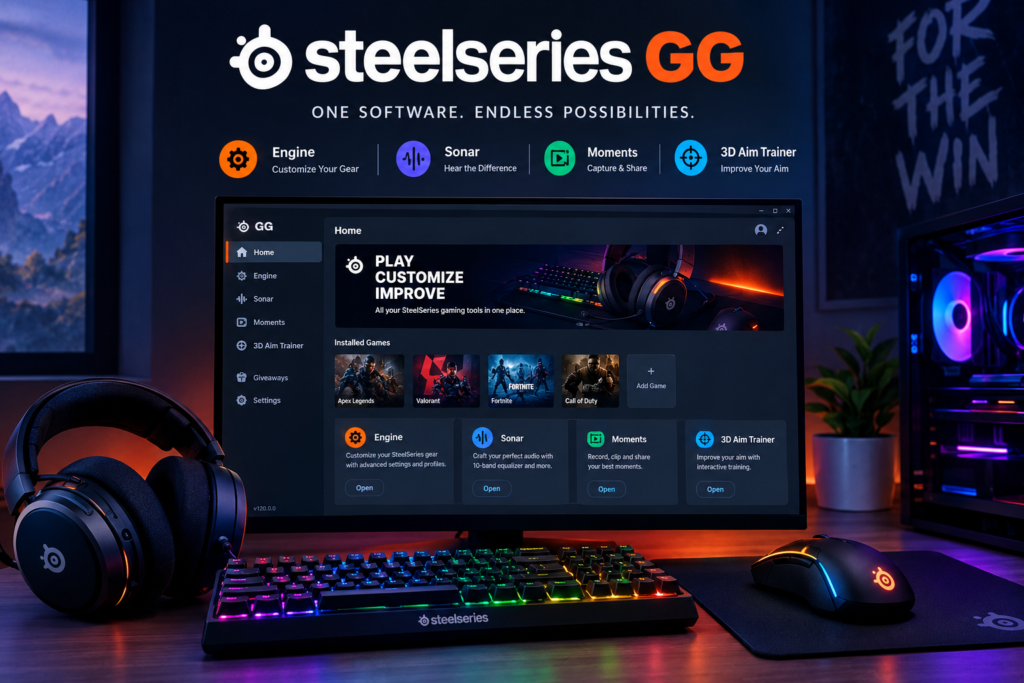
The application is built around several major components. Engine focuses primarily on SteelSeries hardware configuration, while Sonar provides advanced PC audio controls. Moments is designed for capturing and sharing gameplay clips, and 3D Aim Trainer provides exercises intended to help players practice their aiming skills. Together, these tools make GG more than a simple driver or configuration utility.
For someone who has just purchased a SteelSeries mouse or headset, GG is often the first piece of software worth installing. It can detect compatible hardware and expose settings that may not be available through Windows alone. Depending on the device, these settings can include DPI, lighting, equalizer controls, buttons, profiles, firmware, and other customization options.
Why Do Gamers Use SteelSeries GG?
One of the biggest reasons gamers use SteelSeries GG is convenience. Modern gaming peripherals often contain a surprising number of configurable features. A gaming mouse may have adjustable DPI, polling settings, programmable buttons, and onboard profiles, while a headset may include equalizer controls, microphone options, and different audio profiles.
GG puts many of these controls in a centralized interface. This can make it easier to create a setup that matches the games you actually play. For example, you might prefer one mouse configuration for a competitive shooter and another for a strategy game. Similarly, you may want different audio settings for a first-person shooter, a racing game, and casual entertainment.
Another advantage is that SteelSeries continues to update GG rather than treating it as a finished application. New versions can introduce game presets, compatibility improvements, bug fixes, interface changes, and hardware support. That ongoing development is useful because gaming hardware and games themselves are constantly changing.
Understanding SteelSeries Engine
Engine is arguably the most important part of GG for people who own SteelSeries peripherals. It is the section responsible for managing compatible hardware and giving users access to settings that can significantly change how their devices behave.
With a compatible mouse, for example, Engine can allow you to adjust DPI and create different configurations. Keyboards can offer lighting customization and programmable controls, while supported headsets can expose audio-related settings and device controls. Some products also receive firmware updates through the software.
Profiles are another useful part of the experience. Instead of keeping exactly the same configuration for every game, you can create settings that correspond to different applications. This can be particularly helpful for players who regularly switch between games with different control requirements.
Engine can also make a new SteelSeries device easier to configure. Rather than searching through Windows settings for individual options, you can generally start inside GG and look for the connected product. The exact controls depend on the model, so two SteelSeries devices will not necessarily display identical menus.
SteelSeries GG and Sonar Audio
Sonar is one of the most interesting parts of SteelSeries GG because it focuses specifically on PC audio. Instead of simply changing the overall Windows volume, Sonar provides a more detailed way to manage different types of audio.
The basic idea is to separate audio into channels. Game audio, chat, media, auxiliary sounds, and microphone input can be managed individually. This can be useful when you want to balance a game against Discord or another communication application without constantly changing the master Windows volume.
Sonar also provides equalizer controls and presets. An equalizer allows you to change the balance between different frequency ranges. For example, you might adjust the sound to emphasize certain details or create a more powerful overall presentation. However, there is no universal EQ setting that is perfect for everyone. Your headset, ears, game, and personal preferences all affect the result.
For competitive games, audio can be especially important. Footsteps, reload sounds, environmental noises, and voice communication can all provide useful information. Sonar gives players more control over these elements, although software cannot magically replace good headphones, accurate game audio, or careful listening.
Using SteelSeries GG for Game Profiles
Game profiles are designed to make switching between different configurations easier. The basic concept is simple: instead of manually changing settings every time you launch a different game, GG can associate configurations with particular games or applications.
Imagine that you play Valorant, Fortnite, Call of Duty, and a single-player adventure game. You might want different audio or device settings for each one. A profile system gives you a way to organize those preferences rather than keeping one configuration for everything.
This can also be helpful for mice and keyboards. A multiplayer shooter might benefit from a carefully selected DPI and button layout, while another game may require additional shortcuts or a completely different control scheme. Having profiles makes experimentation easier because you can save different configurations instead of constantly rebuilding them.
The important thing is not to overcomplicate your profiles. More settings do not automatically mean better performance. A simple configuration that you understand is often more useful than a collection of dozens of profiles that you rarely use.
SteelSeries GG Moments for Gameplay Recording
Moments is the recording and clipping side of SteelSeries GG. It is designed for gamers who want to capture interesting gameplay without relying entirely on a separate recording program.
This can be useful when you get an unexpected victory, an impressive headshot, a funny moment with friends, or an exciting sequence that you want to save. Instead of recording every second of a gaming session, clipping tools can focus on the moments that are actually worth keeping.
Once you have captured a clip, Moments can also provide tools for working with the recording and preparing it for sharing. This is convenient for players who create short gaming videos for social media or simply want to keep a collection of their favorite moments.
Recording does require system resources, so users with lower-end computers should pay attention to performance. If your game already runs close to the limits of your hardware, recording at high quality can add additional workload. Finding a balance between recording quality and game performance is usually more important than simply choosing the highest available setting.
3D Aim Trainer in SteelSeries GG
3D Aim Trainer is another component available through GG. Its purpose is straightforward: give players exercises that can help them practice aiming skills.
Aim training is particularly relevant for first-person shooters. Skills such as flicking, tracking, target switching, and reaction timing can be practiced repeatedly in controlled environments. This can make training more structured than simply jumping into a multiplayer match and hoping that your aim improves.
One advantage of aim trainers is repetition. In a normal match, you might only encounter certain situations occasionally. A training environment can present similar challenges again and again, allowing you to focus on a specific weakness.
Still, aim training should be treated as practice rather than a shortcut to becoming an excellent player. Game sense, positioning, movement, communication, map knowledge, and decision-making remain important. A player with perfect mouse control can still lose fights by making poor tactical decisions.
How to Set Up SteelSeries GG
Setting up SteelSeries GG is generally straightforward. Start by downloading the application from the official SteelSeries website rather than relying on unknown third-party download pages. This reduces the risk of installing modified or outdated software.
After installation, open GG and allow it to detect your connected SteelSeries hardware. If you have a supported mouse, keyboard, headset, microphone, or another compatible device, it should appear in the relevant part of the application. From there, you can begin exploring the available configuration options.
Do not change every setting immediately. A better approach is to identify what you actually want to improve. If you purchased a mouse, start with DPI and button configuration. If you purchased a headset, begin with audio and microphone settings. Once the basic setup works properly, explore advanced features one at a time.
It is also worth checking for firmware updates when appropriate. Firmware can improve compatibility, correct bugs, or introduce device-specific changes. However, firmware updates should be allowed to finish without unnecessarily disconnecting the device.
SteelSeries GG for Headsets
Headsets are one of the areas where GG can become particularly useful. Depending on the SteelSeries headset model, users may gain access to equalizer controls, microphone settings, device configuration, firmware updates, and other features.
A good starting point is to test the headset with its default configuration. Listen to a few games, music tracks, and voice calls before making major changes. This gives you a reference point and helps you understand what each adjustment actually does.
Microphone configuration deserves attention as well. A microphone that sounds too quiet, harsh, muffled, or overly sensitive can make communication difficult. Adjusting microphone settings can improve your voice quality, but the physical position of the microphone and your room environment are also important.
For gaming, communication should remain clear rather than excessively processed. Too much noise reduction or aggressive filtering can sometimes make a voice sound unnatural. The best setup is generally one that reduces unwanted noise while keeping your speech easy to understand.
SteelSeries GG for Mice and Keyboards
Gaming mice and keyboards can benefit significantly from software customization. With a compatible mouse, you may be able to configure DPI levels, buttons, profiles, lighting, and other controls through Engine.
DPI is one setting that many new players misunderstand. Higher DPI does not automatically mean a better mouse or faster aim. What matters is how the sensitivity feels when combined with your game’s sensitivity settings and the amount of physical mouse movement you use.
Keyboard customization can be equally useful. Depending on the model, you may be able to change RGB lighting, assign functions, create macros, or configure profiles. These features can make a keyboard feel more personalized and convenient.
At the same time, customization should have a purpose. RGB lighting can make a setup look fantastic, but it will not directly improve your reaction time. The same applies to complicated macros that you never use. Focus first on settings that actually affect how you play.
SteelSeries GG Performance and System Resources
Because GG contains several different tools, some users naturally wonder how much system performance it consumes. The answer depends on which components are active, what hardware you have, and what tasks are running.
A lightweight configuration can be quite different from a setup where multiple background features, recording functions, audio processing, and device services are active. If you are trying to maximize FPS on a lower-end PC, it makes sense to disable features you do not use.
Recording software can have a greater impact than simple device configuration. Capturing high-resolution gameplay requires additional processing and storage activity. Similarly, advanced audio processing may use system resources, although the actual impact depends heavily on the computer.
The sensible approach is to monitor your own system rather than assuming GG will either have no impact or cause major slowdowns. If your game performance changes after enabling a feature, test it separately and compare the results.
Common SteelSeries GG Problems
Like any large gaming application, SteelSeries GG can occasionally encounter problems. A device may fail to appear, an update may not complete correctly, a game may not be detected, or an audio device may behave differently after configuration changes.
The first troubleshooting step is usually simple: restart GG and check whether the device is connected properly. If the issue continues, restarting Windows can sometimes resolve temporary software or driver conflicts.
Keeping GG updated is also important. SteelSeries regularly publishes updates that address bugs, improve stability, add game presets, and change functionality. Recent 2026 releases have continued to make improvements across Sonar, Engine, Moments, and aim-training features.
If a problem begins immediately after changing a setting, return to the previous configuration and test again. This is much easier than changing ten settings at once and then trying to determine which one caused the problem.
Does SteelSeries GG Work Without SteelSeries Hardware?
One of the useful aspects of GG is that some of its software features can be used even when you do not own SteelSeries hardware. This is particularly relevant to tools such as Sonar, Moments, and 3D Aim Trainer.
That means GG is not necessarily only a device-control application. A gamer who uses another brand of mouse or headset may still find certain parts of the software useful.
However, the deepest hardware customization naturally comes with SteelSeries products. Engine is designed around compatible SteelSeries devices, so the experience becomes much more valuable when you actually have supported hardware connected.
This makes GG somewhat different from traditional peripheral software. It combines hardware management with standalone gaming utilities, giving users multiple reasons to keep the application installed.
SteelSeries GG on Windows and Mac
SteelSeries GG is primarily associated with PC gaming. SteelSeries currently lists Windows support for the full GG experience, while its support documentation explains that macOS has a more limited update scope.
This distinction matters if you use a Mac. Some functions may be available, but the feature set and future development can differ from Windows. Gamers should therefore check the compatibility information for their particular SteelSeries device before buying it specifically for Mac use.
Linux users should also be aware that SteelSeries support documentation states that GG does not support Linux. This can be an important consideration when choosing gaming peripherals for a Linux-based setup.
For the broadest GG experience, Windows remains the main platform. If your gaming PC runs Windows, you can generally expect the largest selection of software functionality and the most active feature development.
Is SteelSeries GG Free?
SteelSeries GG is available as free software. The application itself does not require you to purchase a subscription simply to access its core gaming tools.
That is a major reason why it can be attractive even to people who are still building their gaming setup. You can explore parts of the software without necessarily purchasing an expensive peripheral first.
Of course, some features are naturally more useful with SteelSeries hardware. Engine’s device customization depends on compatible products, for example. But tools such as gameplay capture and aim training can still have value independently.
The important distinction is between the software and the hardware. GG is free, but it is primarily designed to complement SteelSeries’ gaming ecosystem. The amount of functionality you get from it depends on what you connect and which features you decide to use.
Tips for Getting the Most Out of SteelSeries GG
The easiest way to get more from GG is to avoid changing everything at once. Start with the settings that have the biggest practical impact on your gaming experience.
For a mouse, experiment with DPI and sensitivity until your movements feel controlled. For a headset, start with a neutral audio profile and then make small EQ changes. For a microphone, prioritize clear communication rather than extreme processing.
If you use Moments, test your recording settings before an important gaming session. Make sure clips are being saved correctly and that the recording quality is appropriate for your available storage. There is nothing worse than getting an amazing gaming moment and discovering that it was never captured.
Finally, keep your software organized. Remove profiles you no longer need, disable unnecessary features, and update GG when appropriate. A clean configuration is easier to troubleshoot and usually easier to maintain.
SteelSeries GG and the Future of Gaming Software
Gaming peripherals have become much more sophisticated over the years. A modern headset is no longer simply a speaker and microphone, while a gaming mouse can contain sensors, onboard memory, adjustable settings, and multiple programmable controls.
Software such as GG exists because modern hardware needs a way to expose all those capabilities to users. As peripherals become more advanced, centralized software becomes increasingly important.
The development of GG also shows how gaming applications are becoming broader ecosystems. Audio processing, recording, hardware configuration, game profiles, and training tools can all exist under one interface instead of being completely separate programs.
That does not mean every gamer needs every feature. The real value comes from choosing the tools that solve a genuine problem in your setup. Someone who only needs mouse DPI settings may never touch Moments, while a content creator may use recording tools constantly.
Final Thoughts on SteelSeries GG
SteelSeries GG is much more than a basic peripheral driver. It combines hardware configuration with gaming-focused tools for audio, gameplay recording, and aim practice. For SteelSeries users, it provides a central place to manage compatible devices and personalize the gaming experience. Its strongest advantage is flexibility. You can use Engine for hardware, Sonar for PC audio, Moments for clips, and 3D Aim Trainer for practice. You do not have to use everything. You can simply enable and configure the features that make sense for your setup.
The best way to approach SteelSeries GG is to keep things practical. Do not assume that every advanced setting will improve your performance. Test changes, keep configurations simple, and focus on settings that genuinely make your games more comfortable or manageable.
YOU MAY HAVE MASEED